





Hot Guide & Tips


Software Testing
Please download Test resources to test & compare Moyea SWF To Video Converters with other SWF converters!
1. Music flash controlled by script:
Download Beautiful.swf
2. Interactive game flash:
Download GangsterPursuit.swf
Download CrusaderTrank.swf
More test resources and info...







How to convert Christmas Flash Ecard to MP4 for Kindle Fire?





Price: $99.95


Many people like to make animated holiday Ecards with Adobe Flash now. The generated videos are often Flash SWF file format. However, these SWF videos are not compatible with most portable devices like Kindle Fire. So if you want to send a Christmas Flash Ecard to your friend, how to make it possible for him to view it on Kindle Fire?
Moyea SWF to Video Converter is a powerful and easy-to-use piece of SWF to Kindle Fire converting software on Windows Operating System. It helps users to convert Flash SWF files to Kindle Fire supported MP4 format while keep all the animated effects intact. Then they can play Flash SWF on Kindle Fire. Besides, it is built in with powerful video editing functions like video clipping, video cropping, video effect adjusting, video settings customizing, etc. to guarantee the best-quality output.
Brief Steps on How to Convert SWF to Kindle Fire MP4 Video:Step 1: Add SWF files to the converter.
Download and install the SWF to Kindle Fire Converter and import Flash SWF file. On the main interface, click “Browse” → choose “From Folder” → then select the Christmas Ecard to add to the software. You also can add SWF file from websites like YouTube by clicking "Grab SWF" → pasting the URL → and clicking "Download SWF".
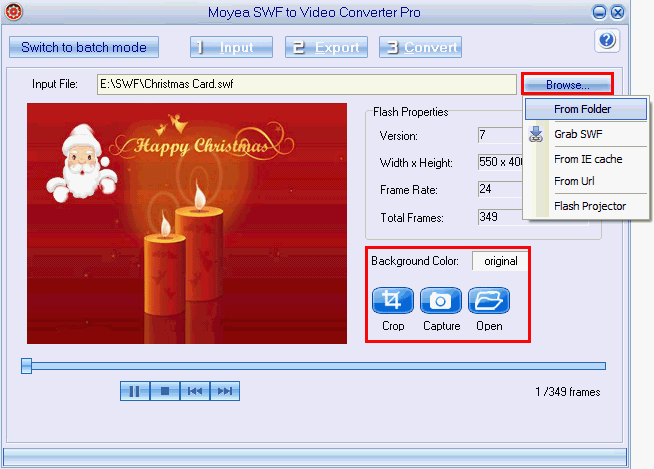
Click the “Switch to batch mode” button on the top left so that you can convert multiple SWF files to Kindle Fire at one time.
Below you can change the background color or crop the SWF file to keep only the selected parts you want.
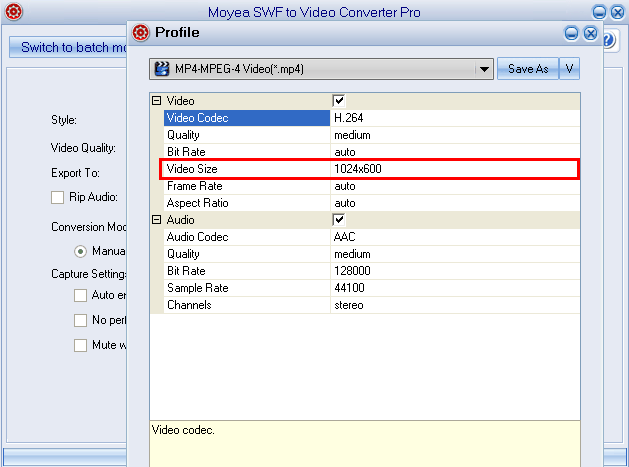
Click “2 Export” and jump to the interface to set the output video format. In "Profile" box choose MP4 from the pop-up formats list. Click “Settings" to change the video size as 1024 x 600 to ensure a full screen playback on Kindle Fire. You can also adjust detailed video parameters like codec, sample rate, frame rate, quality, etc.
Step 3: Start Conversion.
After all the settings are done, click the “3 Convert” button to start to convert SWF to Kindle Fire on Windows.


You may also be interested in these hot tips
- Convert Flash SWF on iPad
- Convert Flash SWF on iPod
- Convert Flash SWF on Apple TV
- Convert Flash SWF on iPhone
- Convert Flash SWF on PSP
- Convert Flash SWF on Zune
- Play Flash SWF on iPad 2
- 3 Ways to Play Flash SWF on iPhone 3GS
- 3 Methods to Play Flash SWF on iPhone 4
- 3 Ways to Play Flash SWF on iPhone 5
- 4 Methods to Play Flash SWF on iPod touch
- Play Flash SWF on Samsung Galaxy Tab
- Play Flash SWF on Samsung Galaxy S2
- How to Play Flash SWF Files on Android Devices
- How to Play Flash SWF Files on iOS Device
- How to Play Flash SWF Files on HTC Titan
- How to Play Flash Animations on Nook Tablet & Nook Color
- How to Play Flash Animations on Wii
- How to Play Flash SWF Files on Motorola Xoom 2
- Play Christmas Flash Ecard SWF Files on Kindle Fire
- Play Flash SWF on Google Android 4.0
- How to play Flash SWF on Nokia Lumia 900
- How to Play Flash SWF Files on iPad 3
- How to Play Flash SWF on HTC Ville and HTC Edge
- How to Play Flash SWF Files on The new iPad
- How to Play Flash SWF on BlackBerry Bold Series Smartphones
- How to Play Flash on iPad Mini
- How to Play Flash on Samsung Galaxy S3
- How to Play Flash on Google Nexus 7
- How to Record 2012 Olympic Events as Flash for HTC One X
- Flash on Galaxy Note 2 - How to Play SWF on Galaxy Note 2
- How to Play Flash on Kindle Fire HD
- Flash for Optimus G - Play SWF on LG Optimus G
- 2 Methods to Play Flash on Acer Iconia Tab 110
- Flash for Galaxy S3 Mini - Play Flash on Samsung Galaxy S3 Mini
- 2 Methods to Play Flash on Asus PadFone 2
- SWF to J Butterfly - Play Flash on HTC J Butterfly
- SWF to Xperia T - Play Flash on Sony Xperia T
- SWF for Nexus 4 - Play Flash on LG Nexus 4
- 2 Methods to Play Flash on Surface RT
- Flash for iPad - Play SWF on iPad 4
- SWF for Nexus 10 - Play Flash on Google Nexus 10
- Flash for VivoTab RT - Play SWF on Asus VivoTab RT
- Flash for Venice - Play SWF on LG Venice
- Flash for Droid DNA - Play SWF on HTC Droid DNA
- Flash for Lumia 920 - Play SWF on Nokia Lumia 920
- Flash for lumia 822 - Play SWF on Nokia Lumia 822
- How to Play Flash Movie on LG Mach
- How to Play Flash on Lumia 620
- How to Play Flash on Huawei Ascend D1
- How to Play Flash on ZTE Nubia Z5
- How to Play Flash on Huawei Ascend Mate
- Flash to Xperia ZL - Play Flash on Sony Xperia ZL
- Flash to Xperia Tablet Z - Play Flash on Sony Xperia Tablet Z
- How to Play Flash on HTC One
- 3 Methods to Play Flash on Asus FonePad