





Hot Guide & Tips


Software Testing
Please download Test resources to test & compare Moyea SWF To Video Converters with other SWF converters!
1. Music flash controlled by script:
Download Beautiful.swf
2. Interactive game flash:
Download GangsterPursuit.swf
Download CrusaderTrank.swf
More test resources and info...






Play Flash SWF on Nook Tablet – The World's Fastest and Lightest Entertainment Gadget





Price: $99.95


If your first reaction is to ask what is Nook Tablet and what can it do, you are in the right place! The content below will be dividedinto several chapters and each chapter will answer one question that you may want to know about Nook Tablet and its predecessors.
What is Nook Tablet?
Actually Nook Tablet is the latest member in Nook family which was released on Nov 17th, 2011. Generally speaking, it is a fastest and lightest entertainment device that can play millions of movies, TV shows, music, books, magazines, comics and kids' books. And Nook Tablet has two predecessors named Nook Simple Touch and Nook Color respectively. The chart below can help you well-understand the background info of each model.
Model |
Nook Color |
Nook Simple Touch |
Nook Tablet |
Release Date |
26 October 2010 |
10 June 2011 |
November 17, 2011 |
OS |
Custom Android 2.2 |
Android 2.1 |
Android 2.3 with customized UI |
Dimensions |
210x130x12(HxWxD in mm) |
170x130x12(HxWxD in mm) |
205x127x12(HxWxD in mm) |
Weight |
450g |
212g |
400g |
Manufacturer |
Barnes & Noble |
Foxconn |
Barnes & Noble |
Current Price |
$199 |
$99 |
$249 |
What can Nook Tablet do?
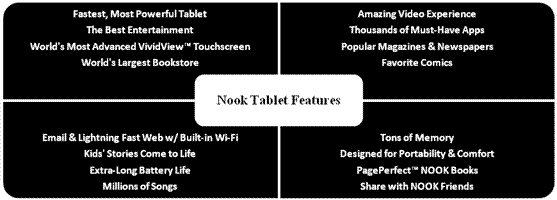
Nook Tablet can do almost everything you want it to do. It is definitely one of the most powerful entertainment tools ever. Let us have a close look at some of its amazing features.
What file types does Nook Tablet support?
EPUB |
Adobe DRM or DRM free, PDF file types from computer or microSD card |
Documents |
XLS, DOC, PPT, TXT, DOCM, XLSM, PPTM, PPSX, PPSM, DOCX, XLX, PPTX |
Videos |
MP4,Adobe Flash Player format, 3GP, 3G2 MKV, WEBM (Video Codecs: H.264, MPEG-4, H.263, VP8) |
Commercial Videos |
Netflix video up to 720p and sideloaded video up to 1080p; renders at 1024 x 600 |
Audios |
MP3, MP4, AAC, AMR, WAV, OGG (Audio Codecs MP3, AAC, AMR, LPCM, OGG Vorbis) |
Images |
JPG, GIF, PNG, BMP |
How to play Flash SWF on Nook products?
One of the reasons why Nook Color and Nook Tablet are called the best is because of the full support to Flash SWF. You can watch your favorite Flash content directly on the device without any extra conversion work. Nook Simple Touch is the only model that does not support Flash so far and that’s exactly what this chapter going to solve: find an alternative way to make Flash SWF playable on it.
As you can see from the above chart, Nook supports many different formats, so what we have to do is to convert Flash SWF to any one of them. I’m not sure is there any real Flash to Nook Converter in the market, but a professional SWF to Video Converterdoes offer the same solution.
A quick guide to convert Flash SWF to Nook supported format in just three steps.
Step 1: Import the original Flash SWF file you want to convert into the program.
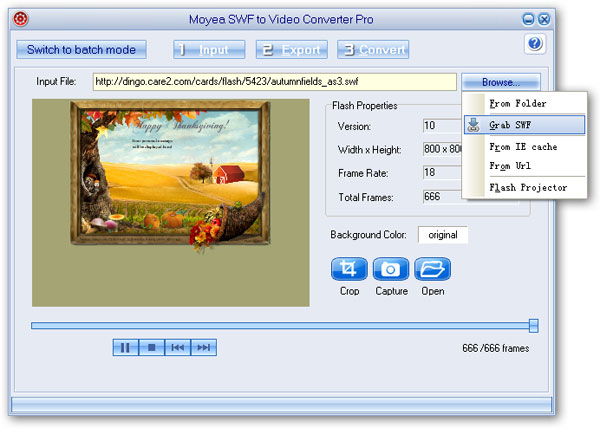
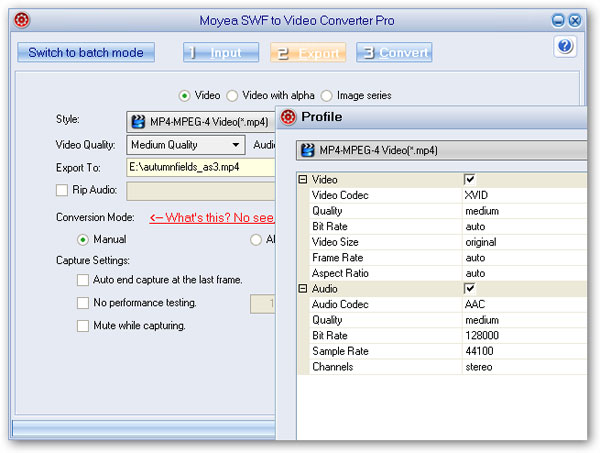
Step 2: Choose any Nook supported format from the drop-down Style menu and access its advanced settings page for more parameter options.
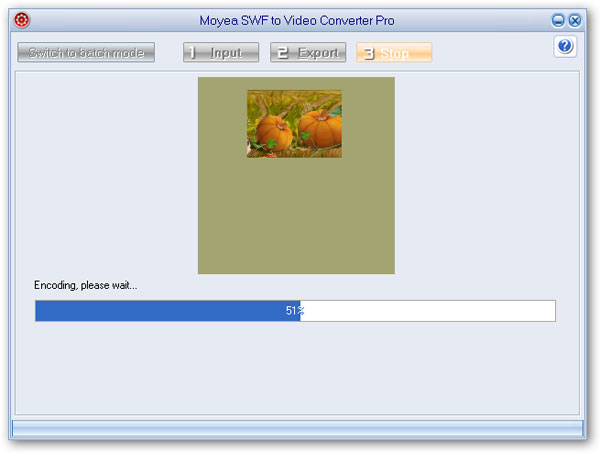
Step 3: Click Convert to start the Flash SWF to Nook conversion after a short performance testing.


You may also be interested in these hot tips
- Convert Flash SWF on iPad
- Convert Flash SWF on iPod
- Convert Flash SWF on Apple TV
- Convert Flash SWF on iPhone
- Convert Flash SWF on PSP
- Convert Flash SWF on Zune
- Play Flash SWF on iPad 2
- 3 Ways to Play Flash SWF on iPhone 3GS
- 3 Methods to Play Flash SWF on iPhone 4
- 3 Ways to Play Flash SWF on iPhone 5
- 4 Methods to Play Flash SWF on iPod touch
- Play Flash SWF on Samsung Galaxy Tab
- Play Flash SWF on Samsung Galaxy S2
- How to Play Flash SWF Files on Android Devices
- How to Play Flash SWF Files on iOS Device
- How to Play Flash SWF Files on HTC Titan
- How to Play Flash Animations on Nook Tablet & Nook Color
- How to Play Flash Animations on Wii
- How to Play Flash SWF Files on Motorola Xoom 2
- Play Christmas Flash Ecard SWF Files on Kindle Fire
- Play Flash SWF on Google Android 4.0
- How to play Flash SWF on Nokia Lumia 900
- How to Play Flash SWF Files on iPad 3
- How to Play Flash SWF on HTC Ville and HTC Edge
- How to Play Flash SWF Files on The new iPad
- How to Play Flash SWF on BlackBerry Bold Series Smartphones
- How to Play Flash on iPad Mini
- How to Play Flash on Samsung Galaxy S3
- How to Play Flash on Google Nexus 7
- How to Record 2012 Olympic Events as Flash for HTC One X
- Flash on Galaxy Note 2 - How to Play SWF on Galaxy Note 2
- How to Play Flash on Kindle Fire HD
- Flash for Optimus G - Play SWF on LG Optimus G
- 2 Methods to Play Flash on Acer Iconia Tab 110
- Flash for Galaxy S3 Mini - Play Flash on Samsung Galaxy S3 Mini
- 2 Methods to Play Flash on Asus PadFone 2
- SWF to J Butterfly - Play Flash on HTC J Butterfly
- SWF to Xperia T - Play Flash on Sony Xperia T
- SWF for Nexus 4 - Play Flash on LG Nexus 4
- 2 Methods to Play Flash on Surface RT
- Flash for iPad - Play SWF on iPad 4
- SWF for Nexus 10 - Play Flash on Google Nexus 10
- Flash for VivoTab RT - Play SWF on Asus VivoTab RT
- Flash for Venice - Play SWF on LG Venice
- Flash for Droid DNA - Play SWF on HTC Droid DNA
- Flash for Lumia 920 - Play SWF on Nokia Lumia 920
- Flash for lumia 822 - Play SWF on Nokia Lumia 822
- How to Play Flash Movie on LG Mach
- How to Play Flash on Lumia 620
- How to Play Flash on Huawei Ascend D1
- How to Play Flash on ZTE Nubia Z5
- How to Play Flash on Huawei Ascend Mate
- Flash to Xperia ZL - Play Flash on Sony Xperia ZL
- Flash to Xperia Tablet Z - Play Flash on Sony Xperia Tablet Z
- How to Play Flash on HTC One
- 3 Methods to Play Flash on Asus FonePad