





Hot Guide & Tips


Software Testing
Please download Test resources to test & compare Moyea SWF To Video Converters with other SWF converters!
1. Music flash controlled by script:
Download Beautiful.swf
2. Interactive game flash:
Download GangsterPursuit.swf
Download CrusaderTrank.swf
More test resources and info...







Flash SWF Playback on iOS 5 Devices – The Whole-New-Level Enjoyment





Price: $99.95


As Apple’s unique mobile operating system and the world’s leading OS as well, iOS has been with us for over four years since its initial release in Jun, 2007.
No matter how pretty the iPhone, iPad, iPod is, and no matter how delicate their design is, iOS is the key to make those devices alive and useable. Let us have a look at several milestones during the iOS version developing history:
| 2007 | 2010 | 2010 | 2010 | 2011 | 2011 | 2011 | 2011 | |
| Jun 29 | iOS | |||||||
| Jun 21 | iOS 4 | |||||||
| Jul 15 | iOS 4.0.1 | |||||||
| Sep 08 | iOS 4.1 | |||||||
| Feb 10 | iOS 4.2.5 | |||||||
| Feb-Mar | iOS 4.2.6 | |||||||
| Mar 09 | iOS 4.3 | |||||||
| Oct 12 | iOS 5 |
It has been a long way that iOS finally came to its current version 5. The brand-new iOS 5 was added up to 200 new features and is a perfect match to the newly-published iPhone 4S as well. More iOS 5 features at a glance:
 |
Notification Center All your alerts. All in one place. |
 |
iMessage iPad and iPod Touch join the conversation. |
 |
Newsstand A custom newsstand for all your subscriptions. |
 |
Reminders A better way to do to-dos. |
 |
Twitter Integrated right into iOS 5. |
 |
Camera Capture the moment at a moment’s notice. |
 |
Photos Enhanced photo enhancements: edit, crop, rotate, etc. |
 |
Safari Even better site-seeing: read web articles free of clutter |
 |
PC Free Independence for all iOS devices.Activate and set up wirelessly. |
 |
More Features |
However, regardless the fact that iOS develops very fast, the door to Adobe Flash Player is still closed. That is the reason whyFlash SWF files can never be officially played on any Apple iOS devices. Although there are a lot of tricks teaching how to make Flash SWF playable on iOS devices, it leads the customers more likely to jailbreak them, which sounds not so good for me.
Here is a much easier way to do it, with the essential assistance from a handy Flash SWF to Video Converter or a Flash SWF to iPhone/iPad/iPod Converter according to the exact iOS device you are using.
There is no any harm to your iOS devices and your original Flash SWF file either. Everything works in the way it should and it only takes 3 steps and 3 minutes to play Flash SWF content on any of your iOS device.
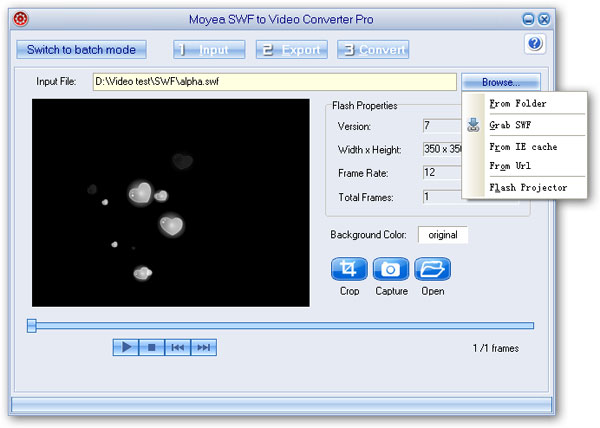
Step 1: Input your source Flash SWF file via one of the import ways it offers.
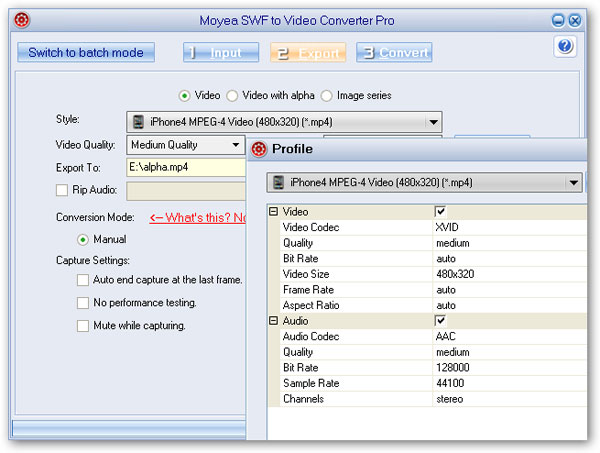
Step 2: Choose the right output video format for your specific iOS device and access the advanced output profile settings for more parameter customizations.
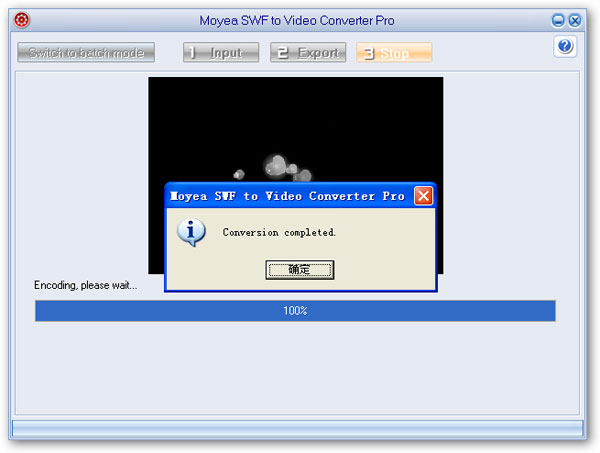
Step 3: Start the Flash SWF to iOS device conversion(no matter what is it) after a quick performance testing.
Update your iOS today for the ultimate Flash SWF playback experience on your iOS devices.


You may also be interested in these hot tips
- Convert Flash SWF on iPad
- Convert Flash SWF on iPod
- Convert Flash SWF on Apple TV
- Convert Flash SWF on iPhone
- Convert Flash SWF on PSP
- Convert Flash SWF on Zune
- Play Flash SWF on iPad 2
- 3 Ways to Play Flash SWF on iPhone 3GS
- 3 Methods to Play Flash SWF on iPhone 4
- 3 Ways to Play Flash SWF on iPhone 5
- 4 Methods to Play Flash SWF on iPod touch
- Play Flash SWF on Samsung Galaxy Tab
- Play Flash SWF on Samsung Galaxy S2
- How to Play Flash SWF Files on Android Devices
- How to Play Flash SWF Files on iOS Device
- How to Play Flash SWF Files on HTC Titan
- How to Play Flash Animations on Nook Tablet & Nook Color
- How to Play Flash Animations on Wii
- How to Play Flash SWF Files on Motorola Xoom 2
- Play Christmas Flash Ecard SWF Files on Kindle Fire
- Play Flash SWF on Google Android 4.0
- How to play Flash SWF on Nokia Lumia 900
- How to Play Flash SWF Files on iPad 3
- How to Play Flash SWF on HTC Ville and HTC Edge
- How to Play Flash SWF Files on The new iPad
- How to Play Flash SWF on BlackBerry Bold Series Smartphones
- How to Play Flash on iPad Mini
- How to Play Flash on Samsung Galaxy S3
- How to Play Flash on Google Nexus 7
- How to Record 2012 Olympic Events as Flash for HTC One X
- Flash on Galaxy Note 2 - How to Play SWF on Galaxy Note 2
- How to Play Flash on Kindle Fire HD
- Flash for Optimus G - Play SWF on LG Optimus G
- 2 Methods to Play Flash on Acer Iconia Tab 110
- Flash for Galaxy S3 Mini - Play Flash on Samsung Galaxy S3 Mini
- 2 Methods to Play Flash on Asus PadFone 2
- SWF to J Butterfly - Play Flash on HTC J Butterfly
- SWF to Xperia T - Play Flash on Sony Xperia T
- SWF for Nexus 4 - Play Flash on LG Nexus 4
- 2 Methods to Play Flash on Surface RT
- Flash for iPad - Play SWF on iPad 4
- SWF for Nexus 10 - Play Flash on Google Nexus 10
- Flash for VivoTab RT - Play SWF on Asus VivoTab RT
- Flash for Venice - Play SWF on LG Venice
- Flash for Droid DNA - Play SWF on HTC Droid DNA
- Flash for Lumia 920 - Play SWF on Nokia Lumia 920
- Flash for lumia 822 - Play SWF on Nokia Lumia 822
- How to Play Flash Movie on LG Mach
- How to Play Flash on Lumia 620
- How to Play Flash on Huawei Ascend D1
- How to Play Flash on ZTE Nubia Z5
- How to Play Flash on Huawei Ascend Mate
- Flash to Xperia ZL - Play Flash on Sony Xperia ZL
- Flash to Xperia Tablet Z - Play Flash on Sony Xperia Tablet Z
- How to Play Flash on HTC One
- 3 Methods to Play Flash on Asus FonePad