





Product List


Software Testing
Please download Test resources to test & compare Moyea SWF To Video Converters with other SWF converters!
1. Music flash controlled by script:
Download Beautiful.swf
2. Interactive game flash:
Download GangsterPursuit.swf
Download CrusaderTrank.swf
More test resources and info...











Price: $49.95


ScreenShot of of Moyea SWF to 3GP Converter
SWF to 3GP Converter - Powerful Flash on Mobile Phone Solution!Moyea SWF to 3GP Converter is designed to convert Flash SWF to 3GP video & 3G2 video for playback on mobile phones, etc. Rip SWF to MP3,AAC audio files and support batch mode conversion. Its manual mode allows capturing interactive Flash for conversion. It support single conversion mode and batch conversion mode. What follows are the screenshots of Moyea SWF to 3PG Converter in single conversion mode.
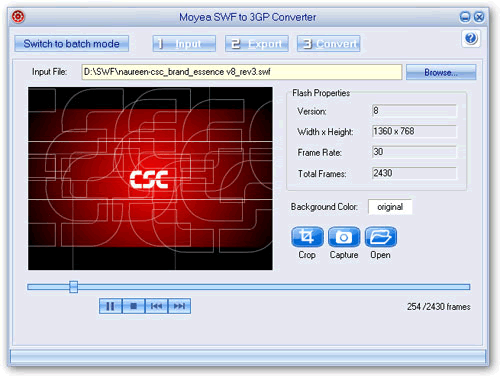
Step 1. Import Source SWF file into program and preview.
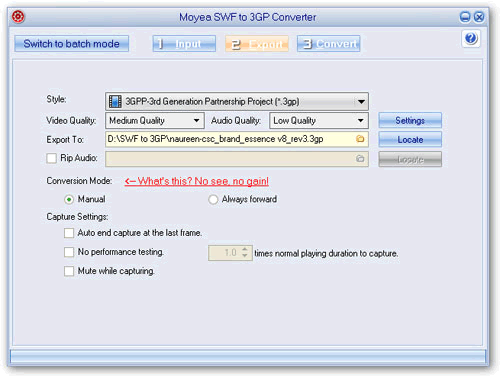
Step 2. Set audio and video parameters for generated 3GP video.
Please remember to designate the destination folder for generated 3GP video file. Meanwhile, you can select to rip audio data to an independent MP3 file or AAC file to accompany the 3GP video.
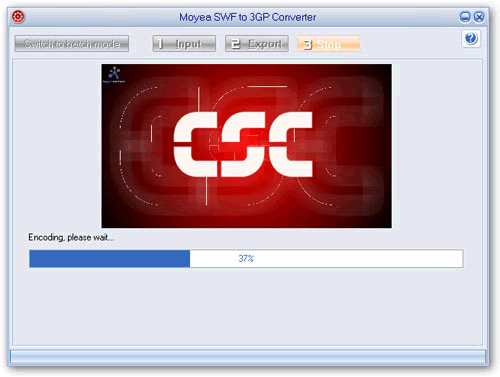
Step 3. Convert to encode the end 3GP video
This step will take a little bit longer time. After you click on Convert, the program will first test capturing the Flash, then capture, and then encode and convert.
Price: $49.95


You May Also Be Interested in These Items
 Moyea SWF to Video Converter Std
 Total Flash SWF to Video Converter Solution for common users! Learn More...
Price: $69.95
 Moyea SWF to Video Converter Pro
The best & the only SWF Converter solution for professionals! Learn More...
Price: $99.95